

Release notes
Get to know SeeSignage’s latest features and improvements.

Adding a playlist to the info page
The info page editor's media carousel now also supports playing playlist images and videos on the info page. Click on the media carousel in the left sidebar of the info page editor. Choose a media library or a playlist as the source of the media carousel. Uutta...

New features for adding media to playlist and other improvements
The user experience of the media library has been improved on SeeSignage's playlists, info pages, publishing channels and templates. For example, you can add new media files directly to the folder when you add media to a playlist. You can now also add media files...

Refresh interval for website widget
You can now add an refresh interval to the website widget in infopage editor. The refresh interval enables the website to be updated e.g. every 5 minutes. It is a useful feature when you want to display the same infopage on the screen for a longer time and be sure...

Seamless video playback on info screens and other improvements
Seamless video playback Videos play more smoothly on Samsung's Digital Signage screens. In video playback, we now use hardware acceleration, so that video playback is more efficient and faster than before. Support for m4v format videos You can now upload videos in m4v...
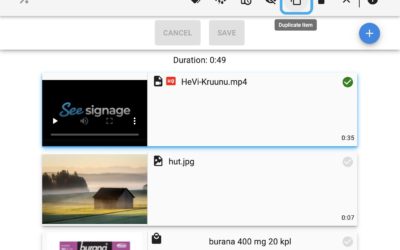
Duplicating playlist item and media sorting function
You can now duplicate a playlist item by selecting the item and clicking the duplicate button on the toolbar. The feature is useful if you want to show the same media several times in the playlist.Media sorting function in the media library when you add a picture or...

Information about new features on the website
From now on, we will inform all our users about new features directly on the front page of the SeeSignage app and on the release notes page of our website. We are constantly developing new features for SeeSignage, and it is important to us that our customers get the...